Like This For Subcribe

Showing posts with label DOWNLOAD LINUX. Show all posts

Thursday, July 28, 2011

BackTrack (lates version)

One of the BackTrack Linux distro which is derived from slackware which is the merger ofwhax and auditor security collection. Backtrack two was released on 6 March 2007 whichinclude more than 300 security tools while the beta version of backtrack 3 was releasedon 14 December 2007 on the third release is more focused on hardware support. While the version of backtrack 3 was released on 19 June 2008 at the backtrack version 3 of this insert saint and maltego while nessus not included and remained on the kernelversion 2.6.21.5. on BackTrack 4 Final today offers the latest linux kernel 2.6.30.4 kernel.Equipped also with a patch for the wireless drivers to cope with wireless attacks injection(wireless injection attacks)
history backtrack

Created by Mati Aharoni BackTrack is a security consultant from Israel. So it is acollaborative community. Backtrack is itself a merger of whax which is one of the Linuxdistributions that are used to test the security of the origin of whax itself from Knoppix.When Knoppix is measure in version 3.0 is called the whax. Whax can be used to test thesecurity of networks everywhere.
Max Mosser is a collection of specialized security auditor himself to penetrate the securityin Linux. The combination of the auditor and Whax itself produces 300 tools used for testing network security. Auditor security collection is also available on knoppix.

Backtrack release

26 - 5 - backtrack first 2006 release which is a non-beta version 1.0
13 - 10-2006 backtrack 2 first beta version for public release
19 - 11-2006 backtrack a second beta version 2 for public release
06 - 03-2007 backtrack 2 final version released
17 - 12-2007 backtrack 3 beta version was released first
19 - 03-2008 backtrack 3 final version released
11 - 01-2010 backtrack 4 final version released
10 - 05-2011 backtrack final version 5 released

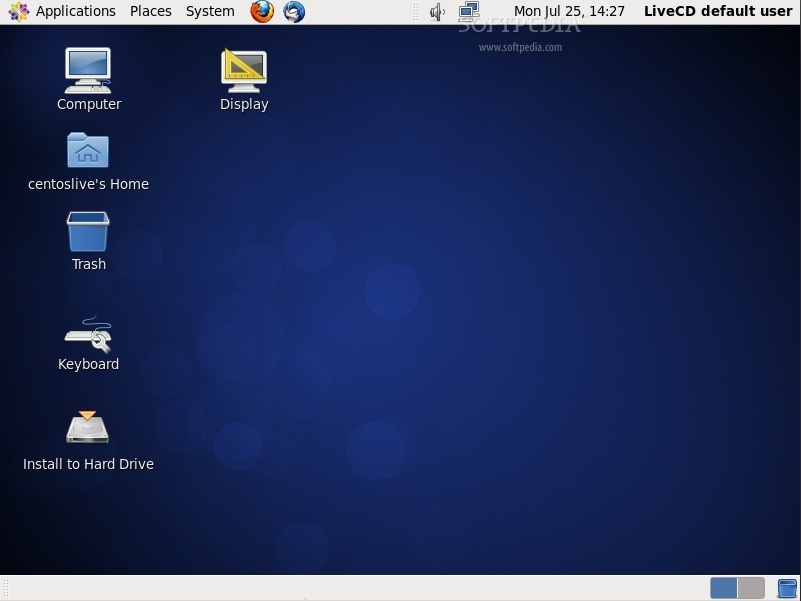
CentOS 6.0 Live CDs Are Now Available for Download


After the official release of the CentOS 6.0 Linux distribution two weeks ago, on July 10th, we are now proud to announce that Live CD images are also available for anyone who want to try this wonderful operating system without installing.

CentOS 6.0 Live CD is powered by Linux kernel 2.6.32 and the GNOME 2.28.2 desktop environment. It includes popular applications, such as Mozilla Firefox 3.6.9, Mozilla Thunderbird 3.1.3, The GIMP 2.6.9, and Pidgin 2.6.6.

Because of space constraints the CentOS developers could not include all the usual desktop applications, therefore they are available on the CentOS 6.0 Live DVD images (see the download link at the end of the article).

CentOS 6.0 Live comes as CD and DVD ISO images, available for both 32-bit and 64-bit architectures. CentOS 6.0 Live CD images can now be installed on the local hard drive, but they can also run directly for CD media or USB flash drivers.


Review image
CentOS 6.0 Live CD

CentOS 6.0 Live can be successfully used as a powerful workstation. Being based on the Red Hat Enterprise Linux 6.0 distribution, CentOS 6.0 brings all its features, with which is 100% binary compatible.

The CentOS 6.0 Linux distribution was completely rebuilt using a brand-new build system and library checks, in order to confirm RHEL binary compatibility.

About CentOS

CentOS is a community enterprise operating system, based on the Red Hat Enterprise Linux sources and available for the following architectures: Intel 32-bit, Intel IA-64 (Itanium 64-bit), 64-bit (AMD's AMD64 and Intel's Intel 64). Additionally, CentOS is a 100% free Linux distribution fully compatible with Red Hat Enterprise Linux.

Download CentOS 6.0 Live CD and Live DVD images right now from Softpedia.

Download CentOS 6.0 installable DVD images right now from Softpedia.

Ubuntu 11.04 Review


Ubuntu is a community-developed operating system that is perfect for laptops, desktops and servers. Whether you use it at home, at school or at work, Ubuntu contains all the applications you'll ever need, from word processing and email apps, to web server software and programming tools. Ubuntu is and always will be free of charge. You do not pay any licensing fees. You can download, use and share Ubuntu with your friends, family, school or business for absolutely nothing.


Canonical has made great strides with its Ubuntu operating system in just a few years, more than other developers have made in a decade. Mark Shuttleworth, founder of the Ubuntu distribution, is known for his risk taking nature and Ubuntu 11.04 is evidence of that attitude.

Natty Narwhal has been promoted as a groundbreaking Linux distribution, especially regarding the new and almost unique interface, called Unity. It's still unclear if Canonical has managed to pull it off, as there is major resistance in the open source community towards embracing Unity and all its features, but we hope to shed some light on the new and improved Ubuntu 11.04 OS and sway people in a direction or another.

Ubuntu 11.04 (Natty Narwhal) has passed through the usual steps before reaching a stable version (3 Alphas and 2 Betas), but respecting the allotted schedule which practically states that a new version of Ubuntu surfaces once every six months.

We could have rushed a review in the first couple of days after the official launch or even have a so called review, based on previous unstable versions, online in the same day as the launch. We prefered to actually test it for a couple of weeks so we can give a pertinent opinion and not some hateful first impression.

Installation


Testing an operating system is not an easy task and cannot be compared with a simple software review. Therefore we had to test on several configurations (older and newer) making sure we would cover a larger base of users. The following hardware configurations were used:


· MSI P35 Neo2 Motherboard
· Intel Core 2 Duo E4500 Processor
· Nvdia GeForce GTX 460 Video Card       
· 2 GB RAM
· IDE HDD 500 GB Seagate
· Asus CD-RW/DVD-RW Drive
· 19" Samsung 940N LCD
· Intel Gigabyte GA-965P Motherboard
· Intel Pentium 4 3 GHz
· Nvidia Leadtek Geforce 7300GS 256 VRAM
· 2 GB DDR2 RAM
· SATA HDD 80 GB Seagate
· Samsung WriteMaster CD/DVD RW Drive
· 19" DELL LCD


dots


· DELL OUT225 OPTIPLEX 740
· AMD Athlon 64 X2 Dual Core 4200+       
· GeForce 6150 LE
· 2 GB 667 MHz DDR2 SDRAM
· 250GB 7200RPM HDD
· DVD+/-RW Optical Drive
· 21" Samsung LCD
· Asus P5p43td Motherboard
· CPU Intel Core 2 Duo Quad Q8400
· ATI Radeon HD 5750
· 4GB DDR3 SDRAM
· 500 GB 700 RPM Western Digital HDD
· DVD+/-RW Optical Drive
· 21" Samsung LCD                                 


Ubuntu 11.04 comes as usual for 32-bit and 64-bit machines, on a 700 MB ISO image. Either you install it from a CD, an USB key, or from Unetbootin, the procedure is the same as it was in the last Ubuntu distribution, with the same steps.

Unfortunately, during the installation we've encountered what we consider a serious bug. When users choose to manually partition their hard drives and select a custom mount point, the installer won't allow any editing to that particular field, so users have two options: either use a predetermined mount point from an available list, or install the operating system after booting it in a Live CD session and simply pasting the custom mount point from a text editor. As far as we know there is no other solution to this serious bug, and Canonical doesn't seem to take into consideration.

The rest of the installation should go smoothly and there are no major differences from the previous release of the Ubuntu distributions.

First impressions

Lets assume that most users don't actually install alpha and beta distributions. What's the impact of a new interface, radically different from anything that has been done before, on the user's ability to maneuver and successfully comprehend what the developers have actually intended?

The first minute of contact with the new Unity environment is one of wonder and appreciation. Unfortunately, we now live in a time when people don't want to learn new stuff in order to use an operating system or a new program. That is precisely the reason why Linux, Microsoft and Apple developers don't make big jumps in terms of design and functionality, as they don't want to alienate people from their operating systems.

Unity
 

For some users, Unity is too big of a leap. Canonical has decided to scrap the conventional two-panel look and replace it with a lateral dock menu, which so far is stuck on the left side of the screen (sorry left-handed users). Unity can be shrunk and most of the icons can be moved or deleted, but some of them are fixed and, for now, can't be interfered with.


Review imageReview image


Right about now, Ubuntu users are probably grinding their teeth if they want to use Unity or not, thinking they can never accept an interface which is not as flexible as the old one. I promise, it has a lot of good features and even if we don't want to admit it, this is the future.

Some call it an omission and others call it negligence, but the feature that is most missed in Unity is the ability to group icons by category, like Internet, Office, Audio and Video and so on.

We don't want to be picky, but we have to mention that there are two icons on the bottom of the dock, that seem to have the purpose of gathering all the software installed in the system, in one single place. They are cumbersome and most likely will get redesigned in the near future or with Ubuntu 11.10.

The first of these two icons is called “Applications” and has three categories (each with six entries), one holding Most Frequently Used applications, one with Installed applications in alphabetical order (making it practically useless) and one with Apps Available for Download, listed in some random order.


Review imageReview image


The second icon is called Files & Folders and is grouped like the one we explained above, only this time with other categories: Recent Applications, the Downloads Folder and Favorites Folder. All these can be expanded to show more entries, but this would be rather pointless. Only the Recent Applications has some use, but it's no excuse for the other ones lack of usability.

All in all, two Unity icons trying to do the function of a single one, in GNOME, and failing miserably.


Review imageReview image


Ubuntu 11.04 comes by default with four separate workspaces and a switcher on Unity named, obviously, Workspace Switcher. The transitions are smooth and applications can be moved around between all four workspaces. This is a nice feature which has to be enhanced with CompizConfig manager in order to set it the way you like it.

Another setback in Unity is the application preview. There is none. If a user opens, for example, multiple LibreOffice documents, all will be listed under the same icon, but there is no discernible method to open a specific one. As an alternative, you can use ALT-Tab, but not if the documents are on different workspaces.

In Windows 7, a short pause with the mouse pointer over the dock icons brings up a small preview off all the windows grouped under than icon and users can make selections without much hassle. This is still missing from Unity!

In Ubuntu 11.04, a click on the icon opens all the windows grouped under it and will show all of them, in the same time, in the same manner multiple workspaces are shown. It seems like a workaround and not a valid solution. We can only hope that Canonical will work on it.


Review imageReview image


The dock will hide if an active window needs that space, sliding out of the screen with ease. If there are too many icons, it will shift to a sort-of-3D perspective. You can still scroll through them, but it's quite weird.

We found that heavy users, like yours truly, will actually try to limit the number of docked icons and use the amazing implemented search function. For example, we haven't pinned Synaptic Package Manager in Unity and just preferred to write the first three letters.


Review imageReview image


Unity's dock is not the only novelty. The other major modification in Ubuntu 11.04 is the menubar which has been stripped from the windows and moved, in a global fashion, on top of the screen. Until Ubuntu 10.10 it was possible to hide it and even add icons and applications to it.

Even if it looks the same, the purpose of the upper panel has been changed completely so it houses the menu of the active application. For example, in Firefox, the entire menu is now on top of the screen and not attached to the main window. It may seem weird at first, but this is not actually something new, as Apple has used this system for some years.

Both the dock and the panel respond in a limited fashion to right click, the menus being contextualized for each icon. Lacking a better comparison, Unity looks like the brain child of the Windows 7 Start Menu and the Mac OS Dock.

In light of all the problems we have pointed before, we still liked Unity. Canonical may have rushed it with Ubuntu 11.04, but in spite of all the shortcomings this is definitely the future.

For those of you that are not yet convinced, a GNOME interface is still present, called simply Ubuntu Classic, so there is no need to bash Canonical for the brave move.


Review imageReview image


Other changes

The biggest change, except Unity, is, of course, the introduction of the LibreOffice office suite, instead of outdated OpenOffice.org. This is a really good choice, LibreOffice being a lot lighter in memory usage and a lot prettier. It's still using the ODT format so there's no need to worry that your old documents and other projects from OpenOffice.org won't work.

Another significant change is the replacement of the old music player, Rhythmbox, with Banshee. I can't say it's much of a difference as they look very similar, but apparently it's a lot more stable. Even if it's written in GTK# and Mono, it integrates really well with the new menubar so users will have an easy time using it.

Lots of other software packages received smaller changes, but the last one worth mentioning are the new overlay scrollbars. Nautilus now uses a new set of scrollbars which are smaller and placed outside of the actual window. When the mouse gets close to where the scrollbar should be, they change their size and become draggable. It's a nice touch and it makes you wonder why this hasn't been done before. The environment looks a lot cleaner and spacious this way.


Review imageReview image


Conclusion
 

It's really hard to draw a line and take a firm stand, saying it's either good or bad. As we see it, Ubuntu 11.04, including Unity, is a major step forward. We would like nothing more than Canonical to use all the criticism and improve this amazing interface.

As we said in the beginning of the review, people have a hard time adjusting to major changes, but Unity is more than a change in perspective. It will be the new face of Ubuntu, and, like all major stars, it will endure some corrective surgery to make it more appealing to the broader masses.

It may seem odd to complain about tons of problems with the new interface and in the same time make a recommendation in favor of that interface, but the bottom line is that we liked Unity, with all its issues, and we hope that it will improve and finally move forward beyond what is most likely the last remaining bastion of a bygone era.

Ubuntu can only keep itself on the edge and in competition if it improves and changes faster than users expect. Change drives the innovation and Canonical has proved, with Unity, that they can compete in the next decade with all the major players in the world, when it comes to great operating systems.
By Softpedia


DOWNLOAD UBUNTU HERE

 
Design by Ridwan | Bloggerized by Premium Blogger Templates | MbaH MUBest View 1020 X 700